4.7 The picture on both AI vendors
- Status
- stable
- Owner
- Panaversity
- Approved
- Panaversity ·
In everyday life. Two phone companies offer different plans, but your contacts and your number go with you.
The picture names no AI vendor. Each AI vendor rents out the layers above the line and offers its own memory. An AI vendor can supply infrastructure for knowledge and controls, but the governance, the approvals and the accountability stay with the company. The two boxes follow the picture from the top down.
Anthropic, as verified 4 October 2026. Channels: the Claude apps on web, desktop and mobile, Claude Tag in Slack, and the API.1 Runtimes: Cowork tasks, for everyday delegated work. Claude Code, the coding harness. The Claude Agent SDK (software development kit), which you host yourself. Claude Managed Agents, in beta, is a pre-built agent harness that you can configure. It runs in managed infrastructure, in an Anthropic-managed cloud sandbox or in one on your own infrastructure.2 Memory: Claude generates memory from your chats, and you view and edit it in Settings. On Team and Enterprise plans, owners control whether memory is available, and it is off for each member until they turn it on. Incognito chats are not saved to memory.3 Reaching a KSoR: custom connectors over remote MCP, in Claude, Cowork and Claude Desktop, on every plan. The Free plan allows one. MCP (Model Context Protocol) is a standard way to connect AI apps to other systems.4 Triggers: scheduled tasks run hourly, daily, on weekdays, weekly or on demand. They are time-based.5
OpenAI, as verified 4 October 2026. Channels: the ChatGPT apps, @ChatGPT in Slack and Teams, and the API.6 Runtimes: ChatGPT Work tasks, for everyday delegated work. Codex, the coding harness. The OpenAI Agents SDK, an open-source framework you host yourself.7 The Agents API, in beta, is an OpenAI-managed Codex agent. OpenAI manages the session and the coordination between model and tools, with an OpenAI-hosted sandbox as one option.8 Memory: saved memories that you ask ChatGPT to keep, and reference chat history, both controlled in Settings. Temporary Chat does not create or update memories.9 Reaching a KSoR: custom MCP apps through developer mode. OpenAI documents full MCP support for Business and Enterprise or Edu workspaces on the web, where an admin enables developer mode. It documents read and fetch access for Pro users. Its developer mode page does not list the Free plan.10 Triggers: scheduled tasks run once or on a schedule, on every plan. Event-triggered tasks in ChatGPT Work respond to Gmail, Slack or GitHub activity, on Plus and above.11
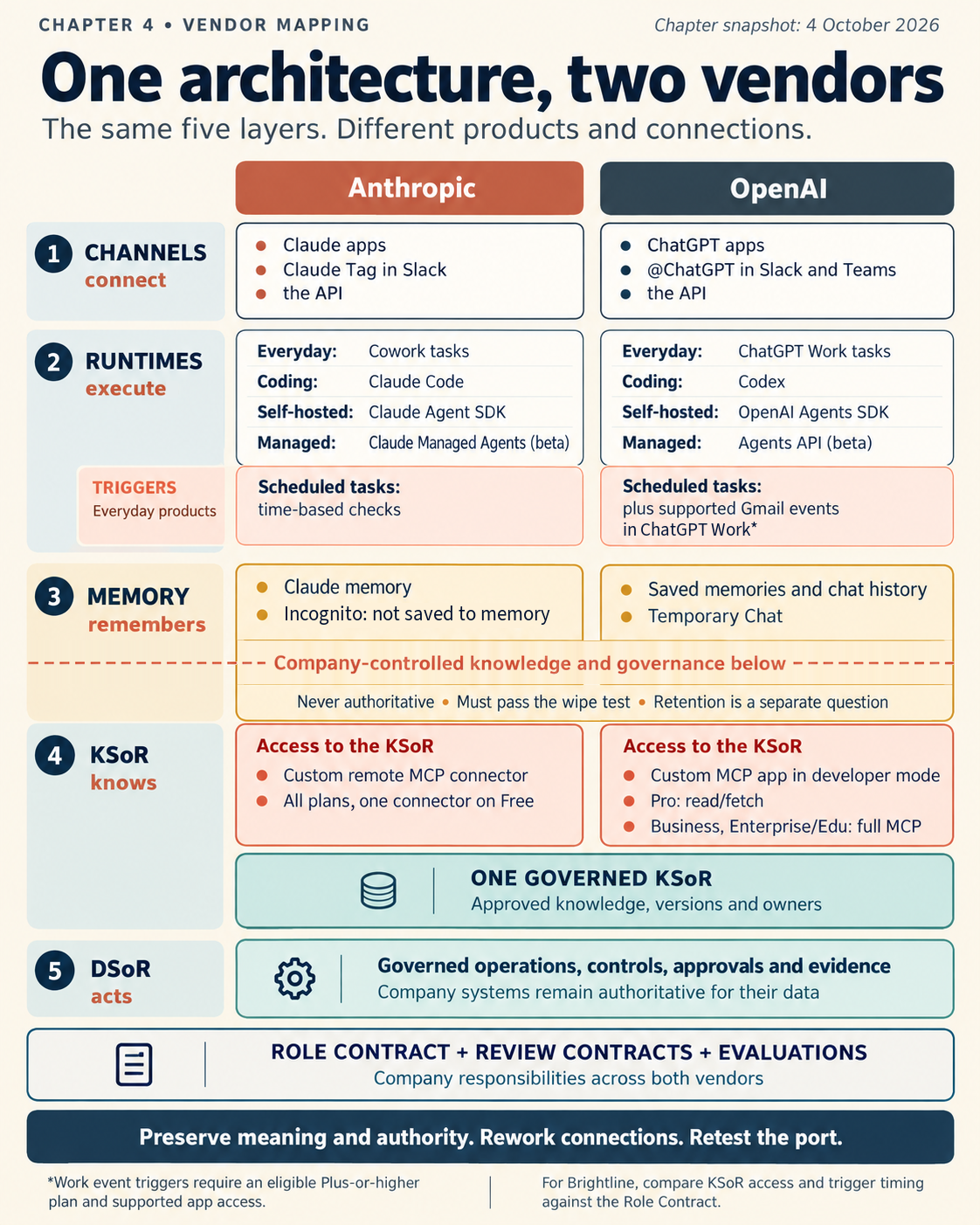
Figure 4.5. The picture on both AI vendors, as verified 4 October 2026, drawn on the same five layers as Figure 4.1. Only the rented layers and the way each one reaches the KSoR differ.
The differences that matter for this Brightline example. There are two. Memory is not one of them. Both AI vendors offer user-controlled memory and chats that are not saved to memory. On both, memory is rented and must pass the wipe test. Chapter 27 compares the AI vendors' data controls and retention.
- How the worker reaches the KSoR. On Claude, any plan can connect one governed record through a custom connector. On ChatGPT, OpenAI documents read and fetch access to custom MCP apps for Pro, and full MCP support, including actions, for business workspaces. That split matches knowing and doing. So on ChatGPT, the plan Brightline buys decides whether the worker can read the governed record at all, or only uploaded files. The plan also decides whether the worker can act through MCP. Uploaded files bring back the problem of Wednesday's stale copy.
- Where the trigger is set. Brightline wants work to start when an invoice reaches the AP inbox. Event-triggered tasks in ChatGPT Work can start on Gmail activity, if the AP inbox is in Gmail. Claude's scheduled tasks start by time, so the design there is a regular check, such as every hour. The two designs are not equivalent until the business says how much delay it accepts. So the Role Contract says "starts within one hour of an invoice arriving." Both designs meet that. Developer tools with event triggers come in Chapter 9.
The invariant. If you replace either AI vendor, everything below the line keeps its meaning. That includes the policies, the delegated authority, the evaluation criteria and the evidence already kept. Connections may need rework, and the evaluations are rerun to prove the port. Portability is a requirement you verify, not a guarantee. Part III builds on one AI vendor and ports to the other, and Chapter 33 deploys one specification on both to prove it.
Check yourself
Question 1 / 8 · current
0 answered
Which runtime is Anthropic's hosted agent harness, in beta as of 4 October 2026?
Sources
- What is Claude Tag?, Claude Help Center.↑
- Claude Managed Agents overview, Claude Platform Docs.↑
- Use Claude's chat search and memory to build on previous context, Claude Help Center.↑
- Get started with custom connectors using remote MCP, Claude Help Center.↑
- Schedule recurring tasks in Claude Cowork, Claude Help Center, updated 29 September 2026.↑
- Using @ChatGPT in Slack and Microsoft Teams, OpenAI Help Center.↑
- OpenAI Agents SDK, OpenAI.↑
- Agents API (beta) FAQ, OpenAI Help Center.↑
- Memory in ChatGPT, OpenAI Help Center.↑
- Developer mode and MCP apps in ChatGPT, OpenAI Help Center.↑
- Scheduled tasks in ChatGPT, OpenAI Help Center.↑
4.6 The governance rule
How the two owned layers split one job between them, and how a written policy becomes a control that software can enforce.
Build step: map the AP Worker onto the picture
Chapter 4's lab: Brightline's AP Worker mapped onto the five layers, a test of which source wins, a port to the other AI vendor, and Draft 3 of the Role Contract, with the artifact checklist.