7.8 The same envelope on both AI vendors
- Status
- stable
- Owner
- Panaversity
- Approved
- Panaversity ·
In everyday life. Two banks both let you set limits on your card. One puts the setting in its app. The other makes you call. Your budget is the same either way.
The Authority Envelope, the written limit on what an AI Worker may do, describes the job, so it does not change between AI vendors. The settings that enforce it do change. The two boxes follow the same seven lines in the same order.
Anthropic, as verified 7 October 2026.
- The conversation setting. Manual asks you before each action, except for tools you set to Always allow.1 Auto keeps working, with automated safety checks before each action.2 Cowork, where Claude carries out longer tasks for you, and Claude in Chrome add a third mode, Skip all approvals, in which Claude asks nothing and no safety check runs before it acts.3
- Per-tool control (7.4). In the settings of each connector, a link from Claude to another app, you set each tool or group of tools to Always allow, Needs approval or Blocked.4 On Team and Enterprise plans, organization owners can set the same choices for the whole organization. Read tools are grouped apart from write and delete tools, and members cannot change the owners' choices.5 On those plans, Cowork asks before connector tools that can write, in every task, unless an organization owner allows Always allow for them.6
- Consequential actions (7.2). Cowork asks before permanently deleting files.3 Anthropic says Claude in Chrome is built not to make purchases, create accounts, delete permanently or follow instructions found in emails or web pages. Anthropic also says it is built to ask before changing permissions or entering sensitive information.7 These statements describe how it is meant to behave. They are not a guarantee.
- Tool order (7.5). Anthropic's computer-use page puts connectors first, as the fastest and most reliable path, then the browser, then the screen. Computer use, on the Pro and Max plans, asks before each app and blocks investment and cryptocurrency apps by default. It has no sandbox, or closed-off space, between Claude and your apps.8
- Prompt injection (7.6). Anthropic's Cowork safety page says an attack needs two things at once. Claude reads information from outside your trusted boundary, and Claude can take actions that could harm you.3 Its research says no browser agent is immune, or fully protected.9
- Runs no one watches. You can choose an approval mode when you set up a Cowork scheduled task by hand. But the help page does not say what happens when an approval is needed and nobody is there.10 Anthropic advises against scheduling tasks that send messages or are hard to undo.3 Claude Code routines, a tool for developers, run without permission prompts and act as you.11
- Admin policy (7.4). Owners choose which connectors members may use,5 and on Enterprise, custom roles can make tool permissions stricter, never looser.12
OpenAI, as verified 7 October 2026.
- The conversation setting. In the desktop app, a permissions control sets local actions, the actions on your own computer. Its choices are Ask for approval, Approve for me or Full access. Approve for me sends a request to an automatic review instead of to you.13 OpenAI's prompting guide also advises adding a rule to your prompt. The rule requires your approval before ChatGPT sends, publishes or changes information other people rely on.14 That is advice about prompts, not a setting.
- Per-tool control (7.4). Each app, OpenAI's name for a connector, can have one of four levels: Always ask, Allow read actions, Allow low-risk actions or Allow all actions. Allow read actions reads without asking and asks before any change. At Allow low-risk actions, the product decides which actions count as low risk.15
- Consequential actions (7.2). ChatGPT agent, the mode in which ChatGPT carries out a task for you, is trained to ask before actions with real-world consequences, such as a purchase. It asks you to watch it during tasks such as sending email, and it is trained to refuse high-risk tasks such as bank transfers.16 These statements describe how it is meant to behave. They are not a guarantee. OpenAI lists sending messages, changing records, changing access, payments and sharing sensitive data as higher-risk actions.15
- Tool order (7.5). OpenAI advises turning on only the apps a task needs,17 and its pages do not put apps ahead of agent browsing. In Atlas, OpenAI's web browser, agent mode pauses on sensitive sites such as banks.18
- Prompt injection (7.6). OpenAI says an attack needs a source, a way to influence the system, and a sink, a capability that becomes dangerous in the wrong context. It says dangerous actions, or sending sensitive data, should not happen silently or without appropriate safeguards.19 Lockdown Mode limits outgoing requests.20 OpenAI says its app safeguards do not remove prompt-injection risk.21
- Runs no one watches. A scheduled task may pause when one of its actions needs approval.22
- Admin policy (7.4). Admins choose which read or write actions each app may use, and how new actions are treated.21 In workspace agents, write actions are set to Always ask by default.23
The comparison. Both AI vendors separate reading from writing. Both let you set permissions per tool or per app. Both let admins set limits that users cannot loosen. And both offer settings that ask a person before consequential actions, the actions with real effects. Three differences change your setup.
The first difference is where the product decides for you. On Claude you set each tool's level yourself. But the conversation setting decides what Needs approval means. Manual asks you, Auto lets Claude's safety checks decide, and only Blocked works the same in every setting.1 On ChatGPT, the Allow low-risk actions level lets the product decide which actions are low risk. So keep Claude on Manual for any action a person must approve. On ChatGPT, compare what the product counts as low risk with your envelope, or choose a stricter level. On either AI vendor, a level that asks before changes still leaves the worker able to change things once you approve. That is execute with approval, not draft.
The second difference is unattended runs, the runs no one watches. ChatGPT's documentation says a scheduled task may pause when an action needs approval, and Claude's scheduling page does not say what happens. Check your setup before you schedule anything with a write tool (Chapter 9).
The third difference is that only Anthropic publishes the connector-first order. On ChatGPT that order is your rule, not the product's.
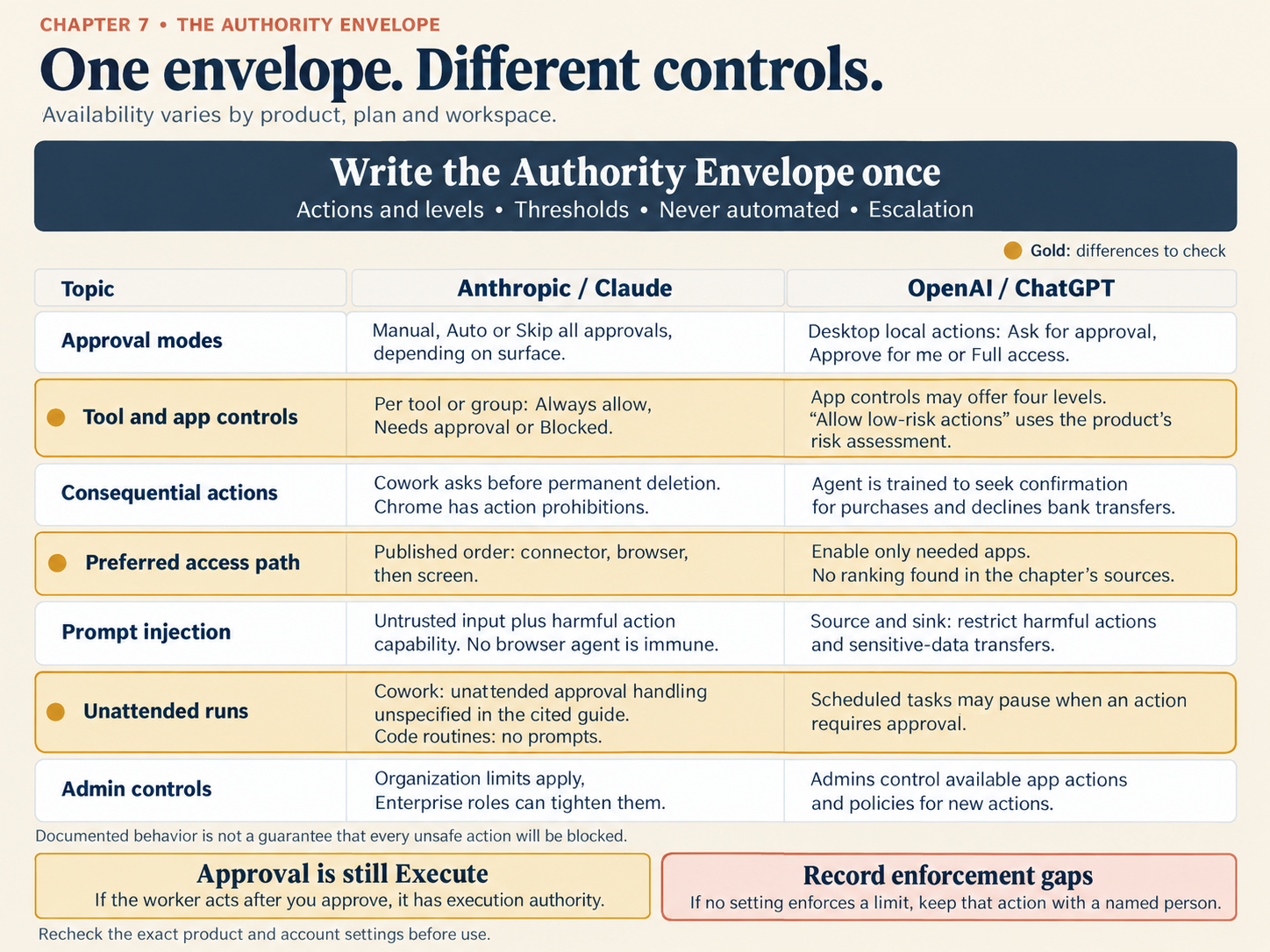
Figure 7.8. The same envelope on both AI vendors, as verified 7 October 2026. The gold rows are the differences that change your setup.
What stays the same. The envelope is written once, by its owner, and it stays the same on either AI vendor. Settings only come close to it. A line that no setting can enforce goes on the gap list. It stays with a person until a system such as DSoR, the Data System of Record, enforces it.
Check yourself
Question 1 / 8 · current
0 answered
Your envelope says the worker may read vendor records but must ask before any change. How do you set a Claude connector?
Sources
- Get started with Claude Cowork, Claude Help Center.↑↑2
- Claude Cowork and chat are one Claude, Claude Help Center.↑
- Use Claude Cowork safely, Claude Help Center.↑↑2↑3↑4
- Get started with connectors, Claude documentation.↑
- Use connectors to extend Claude's capabilities, Claude Help Center.↑↑2
- Use Claude Cowork on Team and Enterprise plans, Claude Help Center.↑
- Claude in Chrome permissions guide, Claude Help Center.↑
- Let Claude use your computer in Cowork, Claude Help Center.↑
- Mitigating the risk of prompt injections in browser use, Anthropic.↑
- Schedule recurring tasks in Claude Cowork, Claude Help Center.↑
- Automate work with routines, Claude Code Docs.↑
- Manage custom roles on Enterprise plans, Claude Help Center.↑
- Permissions, ChatGPT Learn, OpenAI.↑
- Prompting, ChatGPT Learn, OpenAI.↑
- Managing app permissions in ChatGPT, OpenAI Help Center.↑↑2
- Introducing ChatGPT agent, OpenAI.↑
- ChatGPT agent, OpenAI Help Center.↑
- Using Ask ChatGPT sidebar and ChatGPT Agent on Atlas, OpenAI Help Center.↑
- Designing AI agents to resist prompt injection, OpenAI.↑
- Lockdown Mode, OpenAI Help Center.↑
- Admin controls, security, and compliance for plugins and apps, OpenAI Help Center.↑↑2
- Scheduled tasks in ChatGPT, OpenAI Help Center.↑
- ChatGPT Workspace Agents for Enterprise and Business, OpenAI Help Center.↑
7.7 DSoR and the clerk analogy
What a company gives a new accounts clerk, what the same safeguards look like for an AI Worker, and who provides them in Part II.
Build step: draw the envelope, then test it
Chapter 7's lab: write the AP Worker's limits, test how a worker handles a planted inbox on Claude and on ChatGPT, and plan each AI vendor's settings, with the artifact checklist.