7.1 The envelope, the brief and the permissions
- Status
- stable
- Owner
- Panaversity
- Approved
- Panaversity ·
In everyday life. A teenager's curfew, the time they must be home, is 11 p.m. A parent can say "home by 10 tonight." Nobody can say "stay out until 1 a.m." without changing the curfew. And either way, the car keys decide what is possible.
Three different things limit what an AI Worker does. Keep them apart.
The Authority Envelope is the explicit, standing boundary of what a worker may observe, recommend, draft, execute or escalate, including thresholds and the actions that may never be automated. Thresholds are the numbers where a level or an approver changes. To escalate means to stop and ask a person. Explicit means it is stated clearly, in writing. Standing means it belongs to the worker, not to one task. It lives in the worker's Role Contract, the one-page definition of its job, in the part on authority. The worker's owner writes it. The worker does not, and neither does the person who writes today's brief, the written instructions for one task. At Brightline, the wholesale company in this book's story, the AP Worker handles the bills the company owes. Dave, the controller, owns its envelope.
Autonomy in the brief (Chapter 5) is the part of a brief that sets how far one task may go. It can only make the envelope narrower, never wider. "Draft replies, send nothing" is fine. "Pay anything under $5,000" cannot widen an envelope that says the worker never pays.
Permissions are the product settings that decide what the worker's tools can do: which connectors to other apps, such as email, are on, which tools need approval, which folders and logins it can reach. The envelope is the decision. Permissions enforce it, which means they make the tools follow it.
An envelope has four parts:
- Actions and levels. Every action the worker might take, each with its level.
- Thresholds. For example, "over $5,000," above which Dave must approve.
- Never automated. Actions that no setting may ever let the worker do, such as releasing a payment. Chapter 6, on checking a worker's results, moved the question "what must never happen automatically?" here, because it limits the worker, not the review.
- Escalation triggers. When the worker must stop and ask, and whom it must ask.
The first invariant of this book's first edition is "The human is the principal." An invariant is a rule that never changes, and the principal is the person the worker acts for. That invariant says the principal draws the authority envelope.1 This chapter makes that envelope a written record.
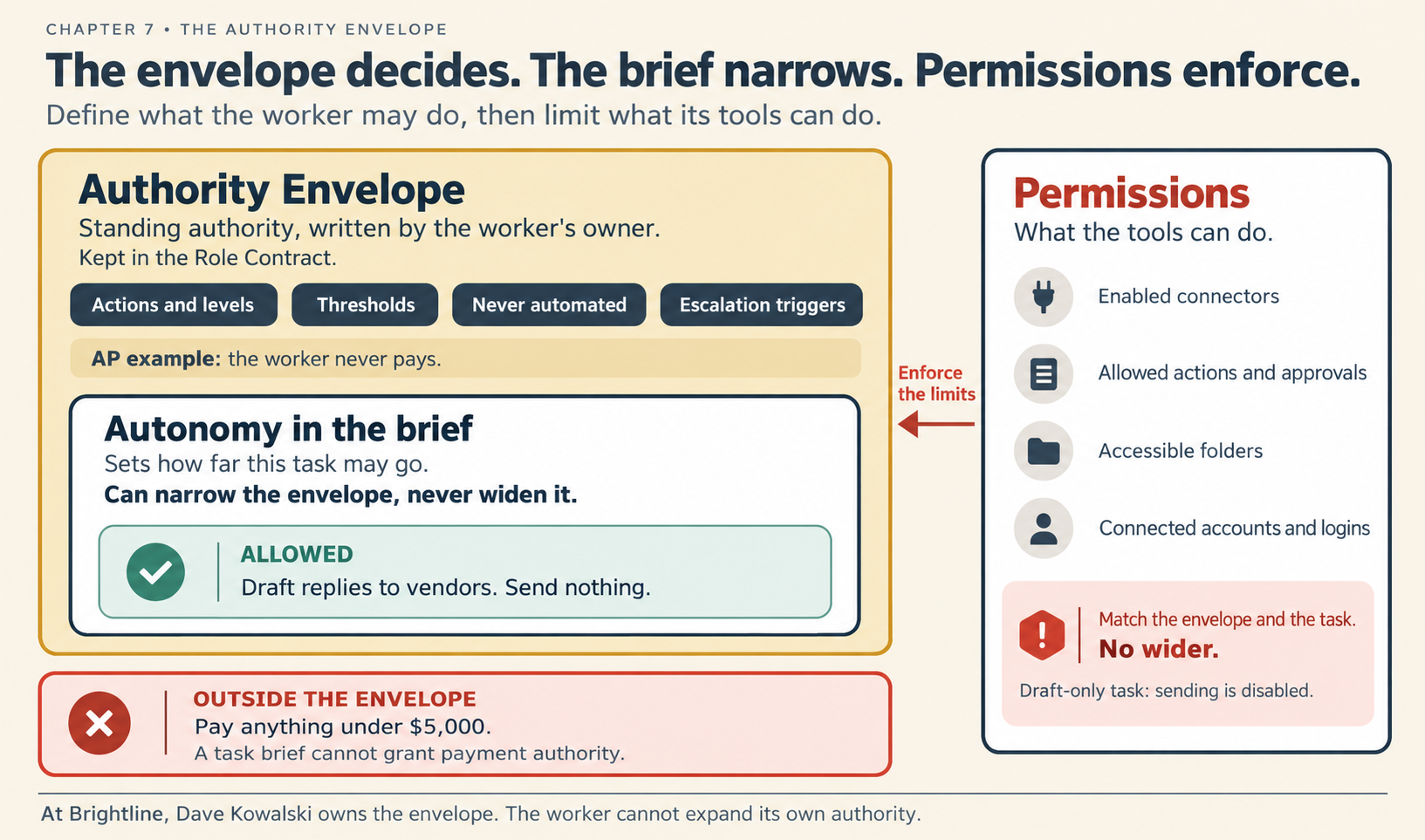
Figure 7.1. Three limits, one inside the other.
Check yourself
Question 1 / 8 · current
0 answered
What is an Authority Envelope?
Sources
Chapter 7. The Authority Envelope
How to write an AI Worker's Authority Envelope: what it may observe, recommend, draft or execute, the thresholds, what is never automated and when it escalates, how to choose each rung, how to set each product's permissions so the worker cannot do more, how to break the risk of untrusted input plus the power to act outward, and why a company never takes a worker's word for anything, on Claude or on ChatGPT.
7.2 The autonomy ladder
The four levels of authority a worker can have for each action, the line that matters most, and how a worker stops and asks a person at any level.