5.8 The same brief on both AI vendors
- Status
- stable
- Owner
- Panaversity
- Approved
- Panaversity ·
In everyday life. The same shopping list works in two supermarkets, as long as it says "the small bag" rather than "the usual."
At work. The same payment-run brief runs in Claude, then in ChatGPT Work, with the same outcome, rules and checks. Both put the run file where the brief says.
The four parts describe the job, not the tool, so one brief should run on any capable worker. The two boxes below follow the same seven lines in the same order. Read the box for the app you use. The other is there to compare. A number such as (5.3) points to the lesson that line matches.
Anthropic, as verified 6 October 2026.
- Where you brief it. Any conversation in the new Claude experience, with no mode to pick. It is being released first to Pro and Max plans. Pro and Max accounts that do not have it yet still see Chat and Cowork.1
- What to include (5.1). Claude's help center lists the desired outcome, the format, and the inputs Claude will need.1 Its guide to Docs adds what the result is for, who will read it and what it should cover. It also says to name the file or app where the content is kept.2
- Outcome or steps (5.2). Describe the outcome, and Claude works through the steps. You do not need to break the work into steps.1
- Inputs (5.3). Attach files and links, or name connected apps such as Google Drive. Google Docs added to a chat or project sync from Drive, so Claude reads the latest version.3
- Plan first (5.4). When you ask for a doc, Claude asks clarifying questions before it writes a draft.2 Manual mode also asks before each action.1
- Deliverables and destination (5.7). Documents, spreadsheets with working formulas and presentations.1 Paid plans also have Claude Docs, Slides and Design, in beta. You can export a doc to Word, PDF, Markdown or Google Docs.2 With the Google Docs, Sheets and Slides connectors, Claude creates and edits Google files. Name the destination you want: a Google file, a Claude Doc or a file to download.3
- Autonomy. A permission setting in the message box. Manual, the default, asks before each action. Auto keeps working, with automated safety checks before actions. It covers the whole conversation, and you can stop or redirect Claude.1
OpenAI, as verified 6 October 2026.
- Where you brief it. Work, chosen instead of Chat in ChatGPT.4
- What to include (5.1). OpenAI's prompting guide lists goal, context, output and boundaries, using only the parts that help. For Work it adds: the result, the source material, the audience, and how you will review the work.5
- Outcome or steps (5.2). Start with the result, not a detailed list of steps. Describe a process only when the process matters.5
- Inputs (5.3). Attach files, use a project, or name connected sources and what to take from each. Add only the sources that matter.5
- Plan first (5.4). Ask for a plan when the approach matters.5
- Deliverables and destination (5.7). Documents, spreadsheets and presentations, including native Google Docs, Sheets and Slides when the Google Workspace app is turned on. OpenAI says to name the output format and where the file should be created.6 On Pro, Business and Enterprise, ChatGPT also makes pages in Space: editable documents you can share and edit together. Name the space when you ask for a page.7
- Autonomy. Boundaries you write in the prompt, such as requiring your approval before ChatGPT sends, publishes or changes information others rely on.5 In the desktop app, a permissions control sets local actions. Ask for approval is the recommended start. Two other choices, Approve for me and Full access, must be turned on in settings first. In settings, Approve for me is called Auto-review.8
The comparison. OpenAI's guide uses other names for the same four parts: goal for outcome, output for format, context for inputs, and boundaries for autonomy. Each product also has a permission control for autonomy. Both have their own editable documents (Claude Docs and ChatGPT pages), and both can create Google files. On both, the destination you name decides where a file is created.
One difference changes the brief. By default, both keep a person involved, but they set the limit in different places. Claude's Manual asks before each action. ChatGPT's desktop Ask for approval can read and edit files in its workspace, the folder it works in, without asking. It asks only before going beyond that. So state in words which actions must wait for you, such as "Change nothing and send nothing." The other differences are about access: where you brief, which plans include it, and what is still in beta. ChatGPT Work needs an eligible paid plan.4
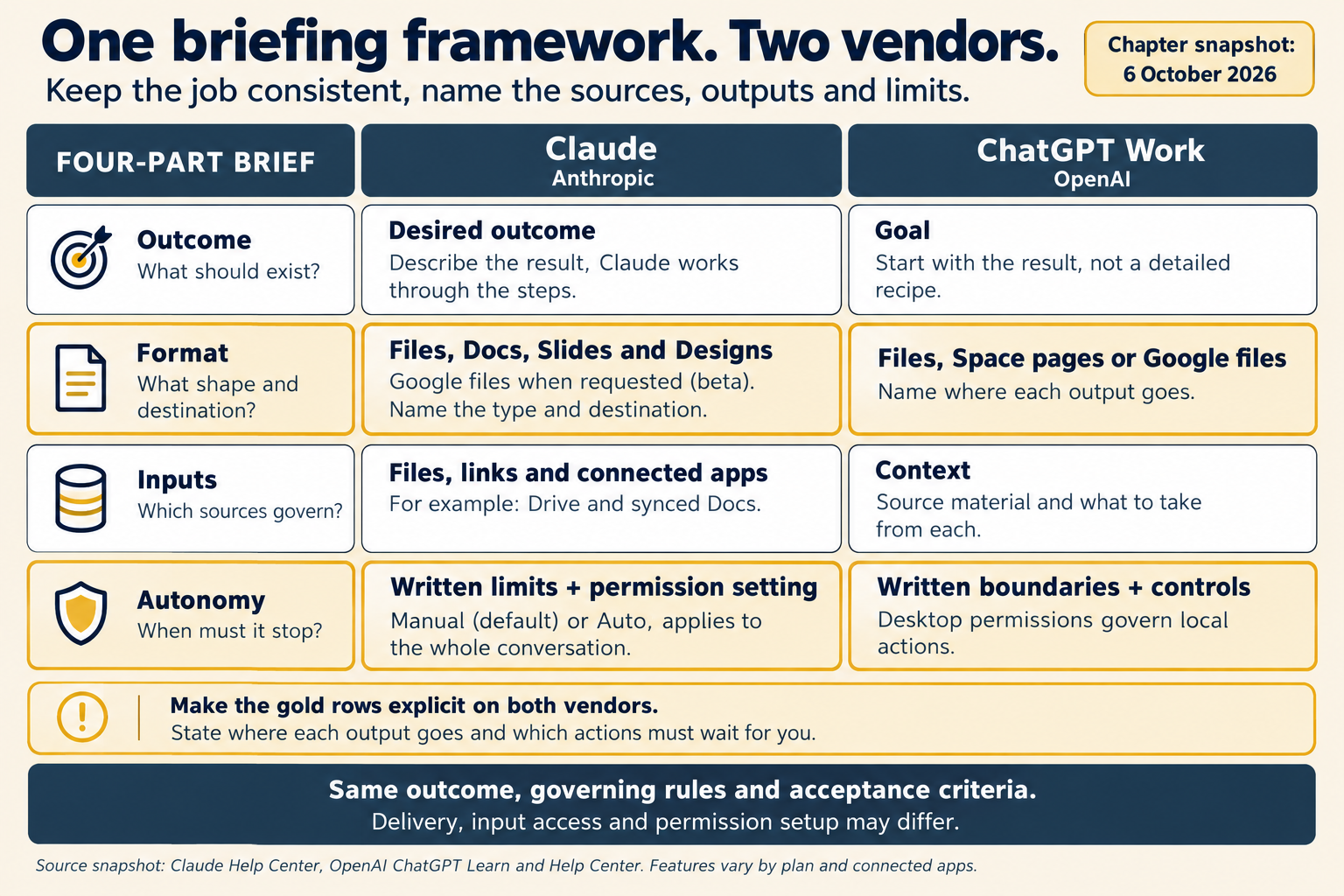
Figure 5.5. The same brief on both AI vendors, as verified 6 October 2026. The two gold rows are the ones to state in words on both AI vendors: where the file goes, and how far the worker may go alone.
What stays the same. The outcome, the rules and the checks you will run stay the same on either AI vendor. Delivery and access details may change: where a file is created, how inputs attach, how permissions are set. If you have to change the outcome or the rules to move a brief, it was describing a tool, not a job.
Check yourself
Question 1 / 8 · current
0 answered
Which four parts does OpenAI's prompting guide list?
Sources
- Claude Cowork and chat are one Claude, Claude Help Center.↑↑2↑3↑4↑5↑6
- Get started with Claude Docs, Claude Help Center.↑↑2↑3
- Use Google Workspace connectors, Claude Help Center.↑↑2
- ChatGPT Work and Codex, OpenAI Help Center.↑↑2
- Prompting, ChatGPT Learn, OpenAI.↑↑2↑3↑4↑5
- Creating and editing documents, spreadsheets, and presentations with ChatGPT Work, OpenAI Help Center.↑
- Getting started with Space in ChatGPT, OpenAI Help Center.↑
- Permissions, ChatGPT Learn, OpenAI.↑
5.7 Choose the output format: inline, artifact or structured data
How the next reader of a result decides whether it comes back in the chat, as a document someone keeps, or as data a system reads.
Build step: one brief, two AI vendors
Chapter 5's lab: one brief for Brightline's payment run, run in Claude and in ChatGPT Work, scored, improved one part at a time and split into two stages, with the artifact checklist.