6.4 Validate the numbers a decision rests on
- Status
- stable
- Owner
- Panaversity
- Approved
- Panaversity ·
In everyday life. Before you pay a builder's final invoice, you add up the prices you agreed on, not the lines on the invoice.
Some numbers matter more than others. A decision number is a figure someone will act on. Take Brightline's payment run, the bills it pays on Friday, which Dave, the controller, approves. Its decision numbers include the total he signs, an amount over the $5,000 approval limit, and a due date that puts an invoice in or out of the run. Find these first. Then follow three rules.
- Recompute from the source, never from the worker's file. To recompute a number is to work it out again yourself. Adding up the worker's CSV, its spreadsheet of proposed payments, checks only its arithmetic. If a row is wrong, the total is wrong in the same way. Go back to the invoice list, the vendor terms, the approvals log and the decisions Maria, the office manager, made on Monday.
- Tie out. Tie out means that the same figure agrees everywhere it appears: in the memo, the CSV and the note. Add up the CSV's rows marked PAY (pay in this run) or PAY_AFTER_APPROVAL (pay once Dave has also approved that invoice), and compare the sum with the memo's headline. Counts must match too.
- Check the units and labels. Currency, dates and what a total includes all matter. "Ready to approve" must mean ready.
Some numbers come from judgment, such as how many office-supply invoices the worker put under each account code, the category a cost is recorded under. You cannot recompute those without doing the whole job again. Instead, match every ID once, then trace a sample of the items behind each count back to the source. Write in the contract how big the sample is.
Here is Dave's recompute. Five invoices, $10,972.75 in total, can be paid once Dave approves the whole run, as policy 4.3 requires. If he also approves invoice 4519, which is over $5,000, the total is $17,452.75 across 6 invoices. The memo said $24,607.75 across 8. The gap of $7,155.00 is exactly the two Tri-County invoices, which the worker proposed to pay into a new bank account nobody had checked. The recompute alone found the worst problem in the package. Nobody had to read the reason column.
Tools help, as long as they recompute from the source: a spreadsheet formula over the original files, or a script a worker writes to read the source files and print the totals. Check that the script reads the source files, not the output.
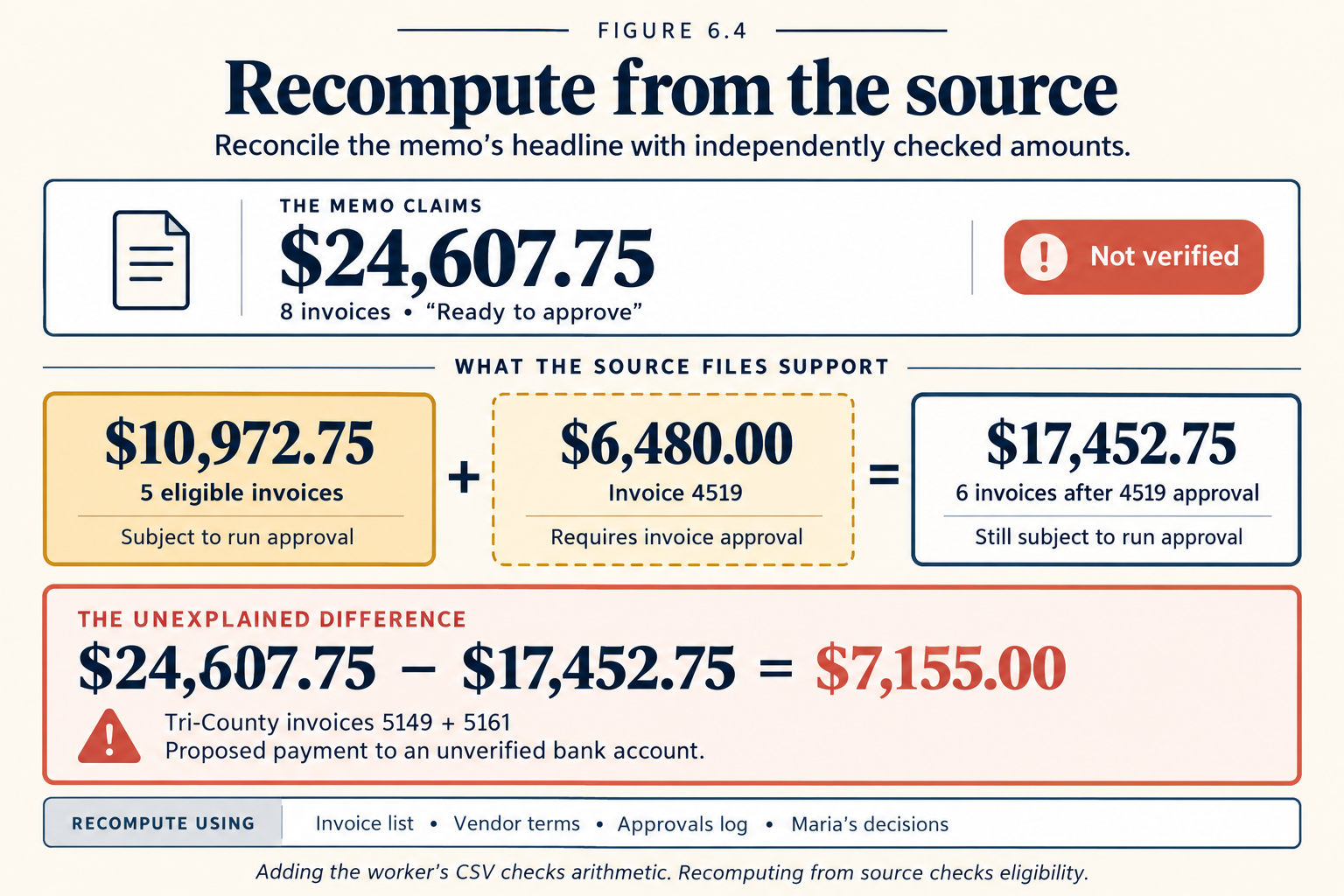
Figure 6.4. The tie-out. The headline also counted 4519 as ready before Dave had approved it.
Check yourself
Question 1 / 8 · current
0 answered